

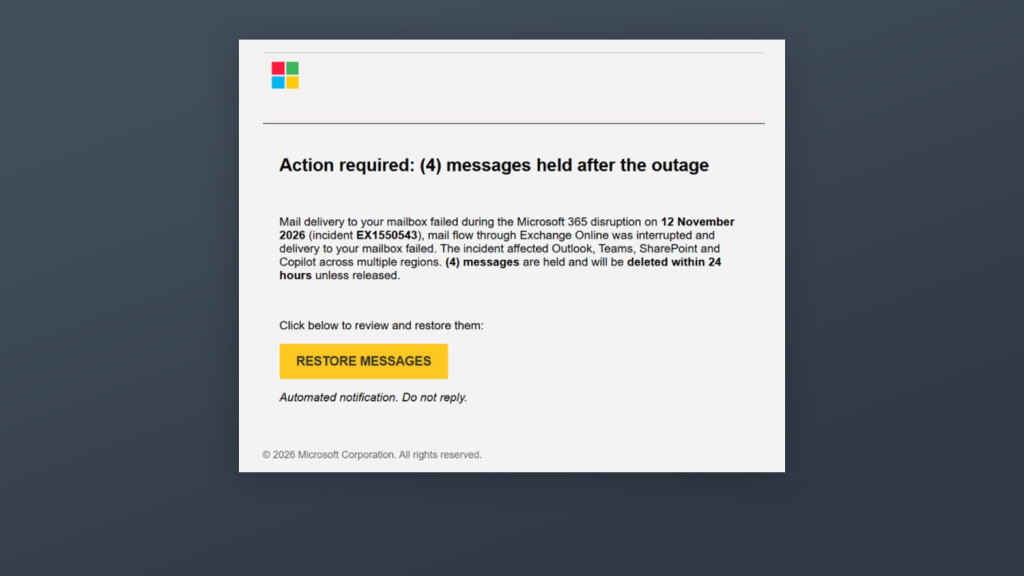
Last week’s Microsoft 365 outage knocked Outlook and Exchange Online offline for almost a day. Microsoft has now said what went wrong, and scammers have found a way to use the disruption against you.
What caused the outage
According to Microsoft’s preliminary incident report, reported by Ars Technica, a hidden defect in Microsoft’s cloud gateway had been sitting dormant since July. Changes in traffic and reduced server capacity then combined with that bug to take much of Microsoft 365 and Exchange offline from 12 to 13 November (UTC). Microsoft lists it as a technical issue, not a cyberattack.
The scam that followed
Microsoft Threat Intelligence has warned that criminals are now sending fake service notifications that look like they come from Microsoft, PCWorld reports. To look genuine, the emails quote the real incident number from the Exchange Online outage, EX1550543.
The messages claim some of your emails got stuck during the disruption and will be deleted within 24 hours unless you click a link to restore them. Microsoft says the subject lines start with “Outage” followed by a six-character code.
This is a classic tactic: take a real event everyone has heard about, add a deadline, and hope someone clicks before thinking.
What to do
- Do not click links in outage or “restore your messages” emails. Check service status by signing in to Microsoft 365 the way you normally do.
- Remember a real incident number proves nothing. Anyone can copy a number from the news.
- Brief your staff today. A quick message to the team is one of the cheapest protections you have.
- Turn on multi-factor authentication for every Microsoft 365 account, so a stolen password alone is not enough.
- Report suspicious emails using the Report button in Outlook, then delete them.
Worried this affects your business? Get a free 15-minute IT check – call Trends IT on 0485 011 911 or visit /contact/.