

Most businesses think of their security cameras as protection. A new report shows they can also be a way in.
Security firm Huntress says that in September and October 2026 it investigated a handful of incidents at customer organisations where attackers got in through camera management software – the Windows program used to view and manage CCTV cameras. Huntress could not work out exactly how the software was compromised, or even confirm who made it, because the program carried no vendor details and kept no usable logs.
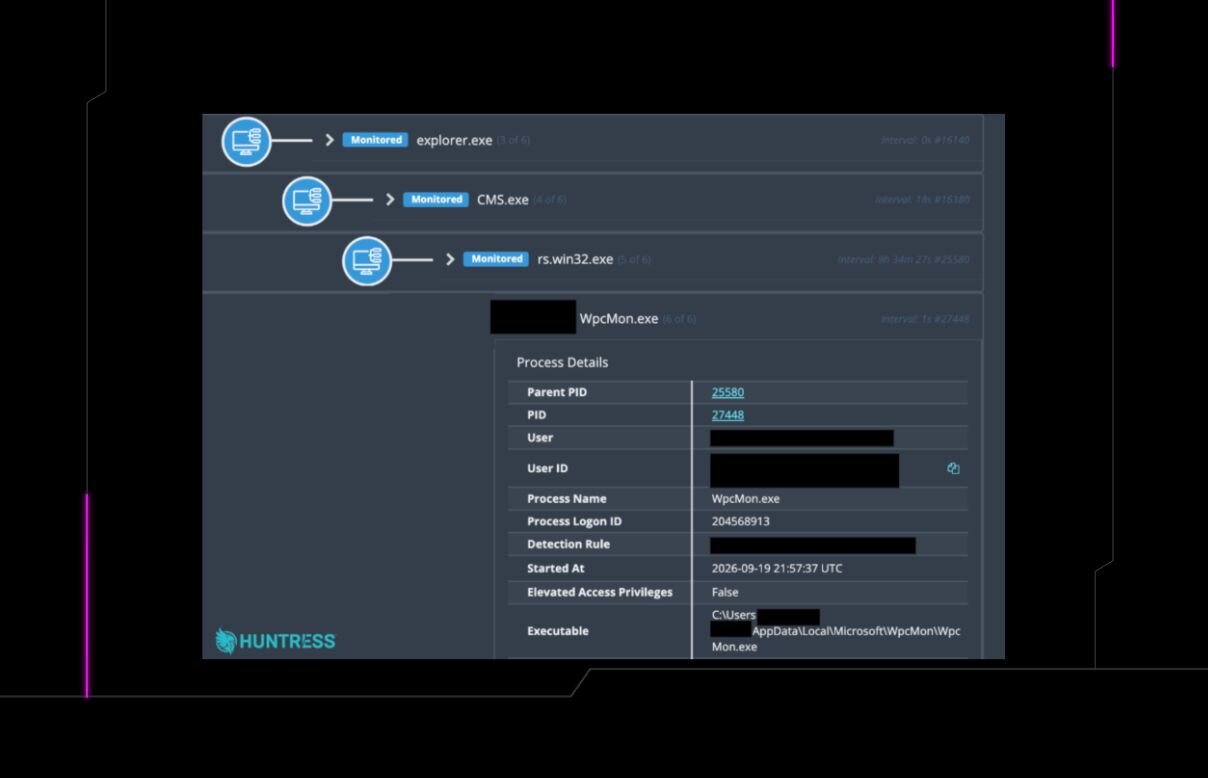
What it could see was what happened next. Once inside, the attackers dropped a remote-access tool onto the computer running the camera software. They then hid their own code behind a genuine Microsoft Windows file, so it looked like a normal program, and set it to start every time the user logged in. From there it quietly contacted a server controlled by the attackers.
Why this matters for a small business
In many offices, shops and warehouses, the camera software runs on an ordinary PC on the same network as accounts, email and customer files. It is often installed once by the camera supplier and never looked at again: no updates, a default password, and nobody checking what it connects to. That makes it an easy blind spot.
Huntress’s advice is to treat camera systems as part of your network, not a separate appliance. In practical terms:
- Know what you have. Find out which computer runs your camera software, who installed it and whether it is still supported.
- Keep it separate. Ideally put cameras and their software on their own network segment, away from your business PCs and files.
- Lock down access. Change default passwords and do not leave the camera system open to the internet unless you have to.
- Watch that PC. Make sure it has up-to-date security software, and get someone to check it for unknown programs or unusual outbound connections.
Nothing here suggests every camera system is affected. The software involved has not been confirmed, and Huntress describes only a small number of cases. But it is a useful reminder that any device on your network can become a doorway.
Worried this affects your business? Get a free 15-minute IT check – call Trends IT on 0485 011 911 or visit /contact/.