

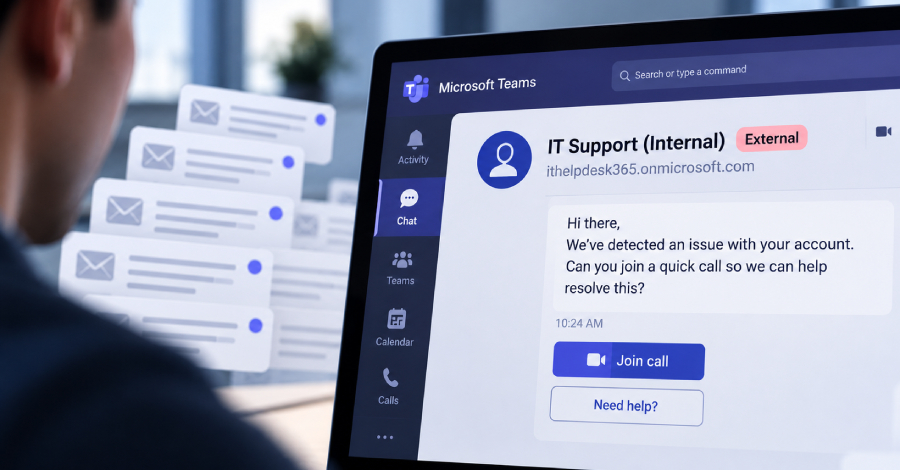
Security researchers are warning about a scam that is showing up again and again in Microsoft Teams. Criminals set up their own throwaway Microsoft accounts, start a chat with your staff from outside your organisation, and pretend to be the IT help desk. According to the researchers, the same pattern has appeared across hundreds of cases, with attackers using it either to impersonate staff or to get malware – and in some cases ransomware – onto company computers.
How the scam works
Teams lets people from other organisations start a chat with your staff. That is handy for working with suppliers and clients, but it also means a stranger can message an employee directly. The message looks like it comes from “IT Support” and usually carries some urgency: a problem with your account, a security update, a mailbox that is full. The goal is to get the person to follow instructions, share details or install something that hands control of the computer to the attacker.
Because it arrives in Teams rather than email, many people trust it more than they should. Most staff have been taught to be careful with email links. Far fewer have been told that a Teams chat can be just as fake.
Help is coming, but don’t wait for it
Separately, Microsoft has announced that Teams will start using AI to spot phishing and scam messages, focusing on higher-risk situations such as a first chat from someone outside your organisation. It is due to roll out from November 2026. That is welcome, but no filter catches everything.
What to do this week
- Tell your team the rule: your IT provider will not cold-contact them through a new external Teams chat and ask them to install software or share a code.
- Check who can message you: Teams has settings that control which outside organisations can chat with your staff. Many businesses only need a short list of trusted partners.
- Verify by phone: if a “help desk” message seems odd, hang up the chat and call your IT provider on a number you already know.
- Look for the “External” label: Teams marks people outside your organisation. Someone claiming to be internal IT should not have it.
Worried this affects your business? Get a free 15-minute IT check – call Trends IT on 0485 011 911 or visit /contact/.